WordPress Plugins
Dropr - Dropbox Plugin for WordPress
Developed by awsmin
⭐
⭐
⭐
⭐
⭐
4.5
$29
USD
Categories
Miscellaneous
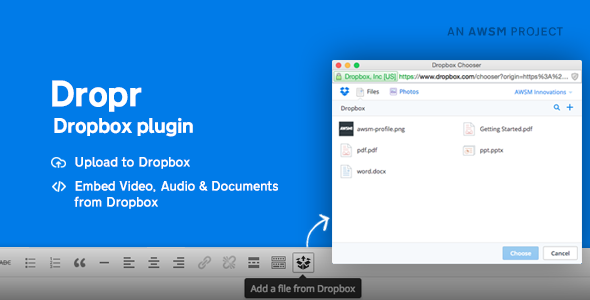
The Dropbox WordPress Plugin – Dropr lets you access files from your Dropbox account and help you to add them straight to your WordPress website. Securely and safely.
How Dropr Works
Dropr essentially turns your Dropbox account into a secondary WordPress Media Library. You can access your Dropbox files from the WordPress text editor screen, then drop files into your content as you please without ever having to upload them to WordPress.
This makes it a great way to save bandwidth, plus Dropbox offers better file management than WordPress.
What makes Dropr stands out is the way it handles different type of files. If you choose an image, video or audio file, your will get a friendly interface to add it into content editor just like WordPress’ default Media Library. If you choose a document Dropr will ask you if you want to embed it to your website using Google Docs Viewer. Dropr also comes with a Download Button customizer for the files you want to put out for free downloads
Main Features
File Chooser
View files from your Dropbox Account
Upload files to Dropbox
Search files within your Dropbox account
Image files
Supports all image file types
Insert images to visual editor and as Featured Image
Options to change dimensions, add captions, etc
Option to insert image as a link
Documents
Embed documents in the website using Google Docs Viewer and Microsoft Office Online Viewer
Supports PDF and Microsoft Office files (MS Word, MS PowerPoint and MS Excel files)
Option to enable and disable download links
Option to insert document as a link
Option to force download a document
Option to preview document in Dropbox
Restrict download link only to logged-in users
Video and Audio Files
Embed Video and Audio files from Dropbox account
Options to insert as plain link and button
Options to change playback options
Options to add alternative file types for maximum HTML5 support
Downloadable Files
Option to insert as a plain link
Option to insert link as a force download button
Option to preview the file in Dropbox
Button customizer to change the style of the download button
Reviews
Changelog
V 1.3.2 [14.06.2024]
- Fixed: 'Embed this' tab hidden issue
- Code improvements and other changes
V 1.3.0 [30.06.2020]
- Added: 'Add from Dropbox' feature in Media Library.
- Added: Directly use an image from Dropbox as a featured image.
- Added: Settings to manage the storage of files (Keep the file in Dropbox or Copy to Media Library).
- Added: Dropbox Native viewer support for Documents.
- Fixed: The Block contains an invalid content error for Links.
- Minor bug fixes and code improvements.
V 1.2.2 [30/03/2020]
- Fixed: 'Dropr' Gutenberg block compatibility issues in WordPress 5.4.
V 1.2.1 [30.01.2020]
- Fixed: A bug that prevents a user from adding content via Dropr block (Gutenberg).
- Fixed: Featured image added from Dropbox not showing in Gutenberg.
Ver 1.2.0 [03.01.2019]
- Added: Gutenberg Support. Dropr Block is added.
- Added: Media Button support in Classic Editor.
- Added: Settings link in the plugin page.
- Fixed: Audio and Video shortcode override issue.
- Fixed: Localization issues.
Ver 1.1.1 [22.05.2017]
- Fixed: A bug that was not letting some photos to be embedded
- Improved: Overall experience and code
Ver 1.1 [06.10.2015]
- New option to add featured images from Dropbox
Ver 1.0.1 [20.08.2015]
- Video & Audio embedding issue is fixed
- Removed Dropbox API validation since it was causing trouble for some users
How Dropr Works
Dropr essentially turns your Dropbox account into a secondary WordPress Media Library. You can access your Dropbox files from the WordPress text editor screen, then drop files into your content as you please without ever having to upload them to WordPress.
This makes it a great way to save bandwidth, plus Dropbox offers better file management than WordPress.
What makes Dropr stands out is the way it handles different type of files. If you choose an image, video or audio file, your will get a friendly interface to add it into content editor just like WordPress’ default Media Library. If you choose a document Dropr will ask you if you want to embed it to your website using Google Docs Viewer. Dropr also comes with a Download Button customizer for the files you want to put out for free downloads
Main Features
File Chooser
View files from your Dropbox Account
Upload files to Dropbox
Search files within your Dropbox account
Image files
Supports all image file types
Insert images to visual editor and as Featured Image
Options to change dimensions, add captions, etc
Option to insert image as a link
Documents
Embed documents in the website using Google Docs Viewer and Microsoft Office Online Viewer
Supports PDF and Microsoft Office files (MS Word, MS PowerPoint and MS Excel files)
Option to enable and disable download links
Option to insert document as a link
Option to force download a document
Option to preview document in Dropbox
Restrict download link only to logged-in users
Video and Audio Files
Embed Video and Audio files from Dropbox account
Options to insert as plain link and button
Options to change playback options
Options to add alternative file types for maximum HTML5 support
Downloadable Files
Option to insert as a plain link
Option to insert link as a force download button
Option to preview the file in Dropbox
Button customizer to change the style of the download button
Reviews
Changelog
V 1.3.2 [14.06.2024]
- Fixed: 'Embed this' tab hidden issue
- Code improvements and other changes
V 1.3.0 [30.06.2020]
- Added: 'Add from Dropbox' feature in Media Library.
- Added: Directly use an image from Dropbox as a featured image.
- Added: Settings to manage the storage of files (Keep the file in Dropbox or Copy to Media Library).
- Added: Dropbox Native viewer support for Documents.
- Fixed: The Block contains an invalid content error for Links.
- Minor bug fixes and code improvements.
V 1.2.2 [30/03/2020]
- Fixed: 'Dropr' Gutenberg block compatibility issues in WordPress 5.4.
V 1.2.1 [30.01.2020]
- Fixed: A bug that prevents a user from adding content via Dropr block (Gutenberg).
- Fixed: Featured image added from Dropbox not showing in Gutenberg.
Ver 1.2.0 [03.01.2019]
- Added: Gutenberg Support. Dropr Block is added.
- Added: Media Button support in Classic Editor.
- Added: Settings link in the plugin page.
- Fixed: Audio and Video shortcode override issue.
- Fixed: Localization issues.
Ver 1.1.1 [22.05.2017]
- Fixed: A bug that was not letting some photos to be embedded
- Improved: Overall experience and code
Ver 1.1 [06.10.2015]
- New option to add featured images from Dropbox
Ver 1.0.1 [20.08.2015]
- Video & Audio embedding issue is fixed
- Removed Dropbox API validation since it was causing trouble for some users
Technical Details
- Developer
- awsmin
- Last Updated
- June 13, 2024
- Published
- November 28, 2025
Compatibility
WordPress Plugins Compatible
No reviews yet
Be the first to review this product.

WooZone - Amazon Associates Bundle Pack
$70
⭐
3.5

