WordPress Plugins
Google Maps - WordPress Map Plugin
Developed by Elfsight
⭐
⭐
⭐
⭐
⭐
4.7
$29
USD
Categories
Utilities
Installing Google Maps plugin increases lead confidence in your business showing details about your physical presence on the homepage. Your clients will appreciate the opportunity to choose of destination easier with a handy list uniting all your locations.
The Maps plugin will surprise you with greater diversity styling features and premade layouts. Our plugin will assist to fulfil the company’s aims.
Install this amazing WP Google Maps pro plugin in just 55 seconds
Let your customers and real-life visitors find you with no trouble at all
Help your visitors get to your location
Makes it easy to share your full contact info along with your working hours with your site’s visitors
20+ predefined icon types AND the option of creating your custom icon
Set your map’s style and appearance to fit your website’s unique design
Run the demo right now. Link to demo
Awesome best Map plugin on WordPress website in a few minutes!
The Elfsight Team proudly presents to you a brand-new widget – responsive WordPress map plugin with multiple locations and markers for your website. We hope that you’ll give it a warm welcome and love it just as much as we do!
It is a simple, functional and fully customizable tool that makes it so much easier for your people to find you! What makes this plugin an absolute must-have for any website, is the ease of installation, and the simplicity of use. Install this amazing WordPress plugin to save your time, and spare yourself and your customers and employees lots of effort and trouble!
Complete Features List
Diverse location markers for an interactive map
50+ location markers
Adding new location by only entering its address, or name, or coordinates
3 marker animation types
Adjustable width and height
All Google Maps features supported: layers, map types, controls
4 map types: Roadmap, Satellite, Hybrid, Terrain
6 types of navigation controls
Switchable dragging and scroll for scaling
5 Google Maps layers: POI, Traffic, Transit, Bike, Street View
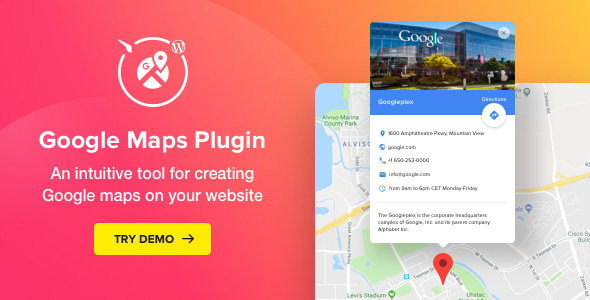
Info card with maximum contact information
Automatic route building from the visitor’s location
5 predefined color schemes
20+ elements with customizable colors
Show/hide location panel to list multiple departments
Edit location panel title and choose elements
Two marker animation types: drop or bounce
URL redirection for each clickable marker
Info card pop up for each marker individually
60+ languages supported
Regular live updates available
Handy editor (no coding required)
Explore more Elfsight plugins to increase sales
Most Elfsight clients like the idea of combining a few tools to solve necessary goals of the website functionality.
This is so easy to run sales and improve your client’s service – just implement some of the Elfsight widgets for WordPress. Have a look at the top products ranked by our users:
Collect more data with the Form plugin.
Demonstrate the fascinating feed via the Facebook plugin.
Use the interactive Pop Ups to announce your discounts.
How to add Google Map to a WordPress website
With our fantastic plugin, it will take less than a minute to have Google Maps added in WordPress website. All you need to do is follow the installation guide.
Download the plugin from Codecanyon.
Add the plugin to the WordPress Admin Panel.
Set the required configurations for the map.
Insert the plugin code.
Done!
Still haven’t checked our plugin live? Do it right now on WordPress Google Map plugin page!
FAQ
Q: Can I add multiple markers to my widget?
A: Elfsight Google Maps allows adding an unlimited number of markers to your map. You can mark your locations and any type of place as well: restaurants, recreational facilities, car parks, and other. Choose an icon for each marker and provide a detailed description.
Q: What information can I display on the info card?
A: Info cards include maximum contact information about your business: you can add a description of the location, its physical address and working hours, phone number, as well as email and website.
Q: Which map settings are available in the widget?
A: All your usual Google Maps settings are available in the widget too. Choose the preferable layer, including Bike, Traffic and Transit; set street view, pick the map type and allow zoom, scroll, and many other handy controls.
Change Log – new version 2.4.2 is available for download
March 26, 2021 – Version 2.4.2
### Fixed
* Fix Mountain icon color
December 25, 2020 – Version 2.4.1
### Fixed
* WordPress 5.6 compatibility issue
November 27, 2020 – Version 2.4.0
### Added
* Polish language
### Changed
* Google Maps version due to the bug in the latest version
September 30, 2020 – Version 2.3.1
### Fixed
* Fixed the error with saving the API key on Preferences tab
September 08, 2020 – Version 2.3.0
### Added
* New Languages: Portugal, Ukrainian
* Multiple phones support
* New Support Form
March 10, 2020 – Version 2.2.0
### Added
* Adding the icons separately, so that they can be used with several locations or categories.
* Icons customization: changing the color and size
* Applying location marker icon to a category
* Uploading a custom icon for a cluster
* Changing the color and size of the cluster icon
* A new collection of SVG icons
### Fixed
* Incorrect zoom after searching for a location on a mobile device
* Adding a location after entering an invalid address
* Animation issue with cluster markers
* Distance in panel is not showing without image
* Map size issue at resize
* Conflict with other Google Maps scripts on a site
* Issue with opening the info window for a cluster location
* Issue with loading the map in a hidden tab
* Adding more locations to a long list of location markers
May 15, 2019 – Version 2.1.0
### Added
* Translation files for the plugin admin panel
* “None” option for the marker click action
* Option to hide the search box in the panel
* The option of displaying location descriptions in the list
### Changed
* POI layer is off by default
* jQuery dependency removed
* Map responsiveness improvements for small resolutions
### Fixed
* RTL issue
* Filters issue
* Directions issue
* Minor additional fixes
January 31, 2019 – Version 2.0.0
### Added
* Locations search by name or location
* The option of finding the nearest marker according to the user's current location
* Sorting markers by distance from the user's location
* The option of setting location categories
* Grouping location into clusters on the map
* Filtering locations by categories
* The option of coloring your widget with theme color option
### Changed
* Redesign of the locations panel
* Editor settings structure
* Improved error handling
August 29, 2018 – Version 1.6.1
### Fixed
* API key issue in the widget editor
August 22, 2018 – Version 1.6.0
### Added
* Block for the new WordPress Gutenberg editor
* Rich text editor for location description
July 27, 2018 – Version 1.5.0
### Added
* Error message display in the editor
* Google API key form in the editor
### Changed
* Widget error message display has been removed from website
June 04, 2018 – Version 1.4.0
### Added
* Custom Google API key support
* Map localization according to the setting selected in Language field
* 53 languages (ar, be, bg, bn, ca, cs, de, el, en-Au, en-GB, eu, fa, fi, fil, fr, gl, gu, hi, hr, hu, id, it, iw, kk, kn, ko, ky, lv, mk, ml, mr, my, nl, no, pa, pt, pt-PT, ro, sk, sl, sq, sr, sv, ta, te, th, tl, tr, uk, uz, vi, zh-CN, zh-TW)
### Changed
* New location input control to reduce requests number
* Widget preview improved
April 25, 2018 – Version 1.3.0
### Added
* Automatic updates functionality
* Opening a ticket form on Support page
* Polski language
### Changed
* Admin design updated
### Fixed
* Location description html issue
March 07, 2018 – Version 1.2.0
### Added
* Locations panel
* Option to open marker by default
* Plugin access roles
* Português language
* Dansk language
### Changed
* Processing coordinates to optimize the operation speed
### Fixed
* Processing coordinates of a lot of markers
* bug in IE11
* Function exist conflict
* Default settings widget saving issue
* https websites issue
December 14, 2017 – Version 1.1.0
### Added
* New option Lang - translates info window UI (en, es, ru, ja)
* New option POI layer - turn on/off points of interest on your map
* New marker icons - number 1-9
* Ability to create a route for http websites (on google maps website in a new browser tab)
### Changed
* Close the current info window when a new one is opened
* Address can be multiline now
* Set correct map center during markers loading
### Fixed
* Special character bug in editor
* Issue with HTML in the marker description
* Cache bug
* Map center bug in the widget preview
* Issue with widget select in WPBakery Page Builder (Visual Composer) element
October 04, 2017 – Version 1.0.1
### Fixed
* Custom icon issue
* Color scheme issue
* Other minor fixes
The Maps plugin will surprise you with greater diversity styling features and premade layouts. Our plugin will assist to fulfil the company’s aims.
Install this amazing WP Google Maps pro plugin in just 55 seconds
Let your customers and real-life visitors find you with no trouble at all
Help your visitors get to your location
Makes it easy to share your full contact info along with your working hours with your site’s visitors
20+ predefined icon types AND the option of creating your custom icon
Set your map’s style and appearance to fit your website’s unique design
Run the demo right now. Link to demo
Awesome best Map plugin on WordPress website in a few minutes!
The Elfsight Team proudly presents to you a brand-new widget – responsive WordPress map plugin with multiple locations and markers for your website. We hope that you’ll give it a warm welcome and love it just as much as we do!
It is a simple, functional and fully customizable tool that makes it so much easier for your people to find you! What makes this plugin an absolute must-have for any website, is the ease of installation, and the simplicity of use. Install this amazing WordPress plugin to save your time, and spare yourself and your customers and employees lots of effort and trouble!
Complete Features List
Diverse location markers for an interactive map
50+ location markers
Adding new location by only entering its address, or name, or coordinates
3 marker animation types
Adjustable width and height
All Google Maps features supported: layers, map types, controls
4 map types: Roadmap, Satellite, Hybrid, Terrain
6 types of navigation controls
Switchable dragging and scroll for scaling
5 Google Maps layers: POI, Traffic, Transit, Bike, Street View
Info card with maximum contact information
Automatic route building from the visitor’s location
5 predefined color schemes
20+ elements with customizable colors
Show/hide location panel to list multiple departments
Edit location panel title and choose elements
Two marker animation types: drop or bounce
URL redirection for each clickable marker
Info card pop up for each marker individually
60+ languages supported
Regular live updates available
Handy editor (no coding required)
Explore more Elfsight plugins to increase sales
Most Elfsight clients like the idea of combining a few tools to solve necessary goals of the website functionality.
This is so easy to run sales and improve your client’s service – just implement some of the Elfsight widgets for WordPress. Have a look at the top products ranked by our users:
Collect more data with the Form plugin.
Demonstrate the fascinating feed via the Facebook plugin.
Use the interactive Pop Ups to announce your discounts.
How to add Google Map to a WordPress website
With our fantastic plugin, it will take less than a minute to have Google Maps added in WordPress website. All you need to do is follow the installation guide.
Download the plugin from Codecanyon.
Add the plugin to the WordPress Admin Panel.
Set the required configurations for the map.
Insert the plugin code.
Done!
Still haven’t checked our plugin live? Do it right now on WordPress Google Map plugin page!
FAQ
Q: Can I add multiple markers to my widget?
A: Elfsight Google Maps allows adding an unlimited number of markers to your map. You can mark your locations and any type of place as well: restaurants, recreational facilities, car parks, and other. Choose an icon for each marker and provide a detailed description.
Q: What information can I display on the info card?
A: Info cards include maximum contact information about your business: you can add a description of the location, its physical address and working hours, phone number, as well as email and website.
Q: Which map settings are available in the widget?
A: All your usual Google Maps settings are available in the widget too. Choose the preferable layer, including Bike, Traffic and Transit; set street view, pick the map type and allow zoom, scroll, and many other handy controls.
Change Log – new version 2.4.2 is available for download
March 26, 2021 – Version 2.4.2
### Fixed
* Fix Mountain icon color
December 25, 2020 – Version 2.4.1
### Fixed
* WordPress 5.6 compatibility issue
November 27, 2020 – Version 2.4.0
### Added
* Polish language
### Changed
* Google Maps version due to the bug in the latest version
September 30, 2020 – Version 2.3.1
### Fixed
* Fixed the error with saving the API key on Preferences tab
September 08, 2020 – Version 2.3.0
### Added
* New Languages: Portugal, Ukrainian
* Multiple phones support
* New Support Form
March 10, 2020 – Version 2.2.0
### Added
* Adding the icons separately, so that they can be used with several locations or categories.
* Icons customization: changing the color and size
* Applying location marker icon to a category
* Uploading a custom icon for a cluster
* Changing the color and size of the cluster icon
* A new collection of SVG icons
### Fixed
* Incorrect zoom after searching for a location on a mobile device
* Adding a location after entering an invalid address
* Animation issue with cluster markers
* Distance in panel is not showing without image
* Map size issue at resize
* Conflict with other Google Maps scripts on a site
* Issue with opening the info window for a cluster location
* Issue with loading the map in a hidden tab
* Adding more locations to a long list of location markers
May 15, 2019 – Version 2.1.0
### Added
* Translation files for the plugin admin panel
* “None” option for the marker click action
* Option to hide the search box in the panel
* The option of displaying location descriptions in the list
### Changed
* POI layer is off by default
* jQuery dependency removed
* Map responsiveness improvements for small resolutions
### Fixed
* RTL issue
* Filters issue
* Directions issue
* Minor additional fixes
January 31, 2019 – Version 2.0.0
### Added
* Locations search by name or location
* The option of finding the nearest marker according to the user's current location
* Sorting markers by distance from the user's location
* The option of setting location categories
* Grouping location into clusters on the map
* Filtering locations by categories
* The option of coloring your widget with theme color option
### Changed
* Redesign of the locations panel
* Editor settings structure
* Improved error handling
August 29, 2018 – Version 1.6.1
### Fixed
* API key issue in the widget editor
August 22, 2018 – Version 1.6.0
### Added
* Block for the new WordPress Gutenberg editor
* Rich text editor for location description
July 27, 2018 – Version 1.5.0
### Added
* Error message display in the editor
* Google API key form in the editor
### Changed
* Widget error message display has been removed from website
June 04, 2018 – Version 1.4.0
### Added
* Custom Google API key support
* Map localization according to the setting selected in Language field
* 53 languages (ar, be, bg, bn, ca, cs, de, el, en-Au, en-GB, eu, fa, fi, fil, fr, gl, gu, hi, hr, hu, id, it, iw, kk, kn, ko, ky, lv, mk, ml, mr, my, nl, no, pa, pt, pt-PT, ro, sk, sl, sq, sr, sv, ta, te, th, tl, tr, uk, uz, vi, zh-CN, zh-TW)
### Changed
* New location input control to reduce requests number
* Widget preview improved
April 25, 2018 – Version 1.3.0
### Added
* Automatic updates functionality
* Opening a ticket form on Support page
* Polski language
### Changed
* Admin design updated
### Fixed
* Location description html issue
March 07, 2018 – Version 1.2.0
### Added
* Locations panel
* Option to open marker by default
* Plugin access roles
* Português language
* Dansk language
### Changed
* Processing coordinates to optimize the operation speed
### Fixed
* Processing coordinates of a lot of markers
* bug in IE11
* Function exist conflict
* Default settings widget saving issue
* https websites issue
December 14, 2017 – Version 1.1.0
### Added
* New option Lang - translates info window UI (en, es, ru, ja)
* New option POI layer - turn on/off points of interest on your map
* New marker icons - number 1-9
* Ability to create a route for http websites (on google maps website in a new browser tab)
### Changed
* Close the current info window when a new one is opened
* Address can be multiline now
* Set correct map center during markers loading
### Fixed
* Special character bug in editor
* Issue with HTML in the marker description
* Cache bug
* Map center bug in the widget preview
* Issue with widget select in WPBakery Page Builder (Visual Composer) element
October 04, 2017 – Version 1.0.1
### Fixed
* Custom icon issue
* Color scheme issue
* Other minor fixes
Technical Details
- Developer
- Elfsight
- Last Updated
- March 25, 2021
- Published
- November 28, 2025
Compatibility
WordPress Plugins Compatible
No reviews yet
Be the first to review this product.

Stellar Video Player - Wordpress plugin
$40
⭐
4.9

Bookshelf Addon for Real 3D FlipBook
$19
⭐
4.7
WooCommerce Gift Card
$30
⭐
3.1