1 / 2
WordPress Plugins
Horizon - Menu Bar Plugin for WordPress
Developed by BonfireThemes
⭐
⭐
⭐
⭐
⭐
4.5
$21
USD
Categories
Menus
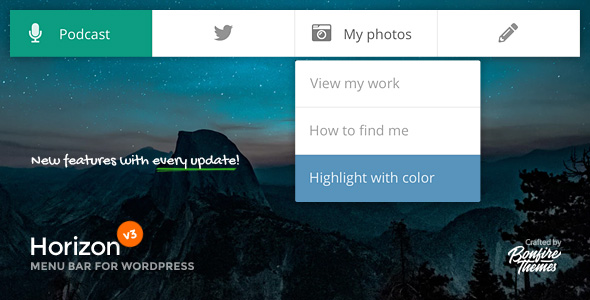
Horizon is a two-level menu bar plugin for WordPress, designed to add a little life to your site’s header or footer. It can be used to highlight certain posts or pages, house your social links, serve as a location to place e-mail and/or phone call buttons to, etc.
By default, Horizon does not interfere with your existing navigation and instead serves as an effective secondary menu. However, should you choose to make Horizon your primary menu, it is entirely possible to hide your existing menu(s) through the included settings. Horizon can also be shown on a specified resolution range only, meaning it can even serve as a mobile-only menu if you’d like.
All in all, with a massive amount of icons, numerous settings and customization options to choose from, Horizon’s uses are many.
Features
Beautifully animated 2-level menubar
Choose from 900+ icons
Add to any theme
Fully responsive all the way down to mobile screens
Make changes using the built-in WordPress customization tools and preview changes in real-time
Position at top or bottom of screen
Fixed or absolute positioning
Optionally show at specified resolutions only
Optionally hide your theme menu by class/ID
Display only icon (label appears on hover) or have both the icon and label be visible at all times
Ability to override the main menu with post- and page-specific menus
Use of icon set means every pixel will look as sharp as it possibly can on all screens
Translation ready
Changelog
Quick update (no version change)
- Prefix updates.
Quick update (no version change)
- Some JS script and translation string updates
UPDATE 3.2
- Added menubar opacity setting, plus option to control opacity hover animation speed.
UPDATE 3.1
- Added distance from browser edges option for menubar
- Added corner roundness option for menubar
UPDATE 3.0
PLEASE NOTE: Version 3.0 is a considerable rewrite and update of this plugin. Due to the name change, all settings now residing in the WordPress Customizer as well as notable changes in how the included Font Awesome 5 icon set functions, pre-3.0 customers will likely need to setup the plugin from scratch. We apologize for the inconvenience but unfortunately this was a necessary evil. To make this transition as smooth as possible, we fully updated the included documentation.
- Moved all settings over to WordPress Customizer
- When at mobile resolutions, the menu bar's text labels are now below the icons and visible at all times
- Added option to hide theme menu by class/ID
- Updated icon set to latest version
- Plugin and all its settings are now translation ready
UPDATE 2.0
- Added fade animation to sub-menu
- Updated icon set to latest version
UPDATE 1.9
- Added absolute positioning option
- Sub-menus now have their own color customization options
- Updated icon set to latest version
- Added option to not load the icon set (for cases when your theme already loads FontAwesome and you don't want it loaded twice)
UPDATE 1.8
- You can now specify the resolution at which you wish to hide the menu (for cases when you want it hidden on smartphones for example)
UPDATE 1.7
- It is now possible to make menu items' labels visible by default. Can be added individually if you'd like just one or two labels to be visible. Instructions available in the documentation
- It is now possible to place the menu at the bottom of the screen
- Updated icon set to latest version
UPDATE 1.6
- The menu can now be customized using the built-in WordPress color customization tools
- Updated icon set to latest version
- When WordPress toolbar is active, it no longer overlaps with the menu
UPDATE 1.5
- Fixed issue where the menu possibly didn't show up on a category page
UPDATE 1.4
- Updated icon set.
UPDATE 1.3
- Added ability to override the main menu with post- and page-specific menus
- Updated documentation accordingly
UPDATE 1.2
- Updated icon set to latest version
UPDATE 1.1
- The plugin now supports sub-menus
By default, Horizon does not interfere with your existing navigation and instead serves as an effective secondary menu. However, should you choose to make Horizon your primary menu, it is entirely possible to hide your existing menu(s) through the included settings. Horizon can also be shown on a specified resolution range only, meaning it can even serve as a mobile-only menu if you’d like.
All in all, with a massive amount of icons, numerous settings and customization options to choose from, Horizon’s uses are many.
Features
Beautifully animated 2-level menubar
Choose from 900+ icons
Add to any theme
Fully responsive all the way down to mobile screens
Make changes using the built-in WordPress customization tools and preview changes in real-time
Position at top or bottom of screen
Fixed or absolute positioning
Optionally show at specified resolutions only
Optionally hide your theme menu by class/ID
Display only icon (label appears on hover) or have both the icon and label be visible at all times
Ability to override the main menu with post- and page-specific menus
Use of icon set means every pixel will look as sharp as it possibly can on all screens
Translation ready
Changelog
Quick update (no version change)
- Prefix updates.
Quick update (no version change)
- Some JS script and translation string updates
UPDATE 3.2
- Added menubar opacity setting, plus option to control opacity hover animation speed.
UPDATE 3.1
- Added distance from browser edges option for menubar
- Added corner roundness option for menubar
UPDATE 3.0
PLEASE NOTE: Version 3.0 is a considerable rewrite and update of this plugin. Due to the name change, all settings now residing in the WordPress Customizer as well as notable changes in how the included Font Awesome 5 icon set functions, pre-3.0 customers will likely need to setup the plugin from scratch. We apologize for the inconvenience but unfortunately this was a necessary evil. To make this transition as smooth as possible, we fully updated the included documentation.
- Moved all settings over to WordPress Customizer
- When at mobile resolutions, the menu bar's text labels are now below the icons and visible at all times
- Added option to hide theme menu by class/ID
- Updated icon set to latest version
- Plugin and all its settings are now translation ready
UPDATE 2.0
- Added fade animation to sub-menu
- Updated icon set to latest version
UPDATE 1.9
- Added absolute positioning option
- Sub-menus now have their own color customization options
- Updated icon set to latest version
- Added option to not load the icon set (for cases when your theme already loads FontAwesome and you don't want it loaded twice)
UPDATE 1.8
- You can now specify the resolution at which you wish to hide the menu (for cases when you want it hidden on smartphones for example)
UPDATE 1.7
- It is now possible to make menu items' labels visible by default. Can be added individually if you'd like just one or two labels to be visible. Instructions available in the documentation
- It is now possible to place the menu at the bottom of the screen
- Updated icon set to latest version
UPDATE 1.6
- The menu can now be customized using the built-in WordPress color customization tools
- Updated icon set to latest version
- When WordPress toolbar is active, it no longer overlaps with the menu
UPDATE 1.5
- Fixed issue where the menu possibly didn't show up on a category page
UPDATE 1.4
- Updated icon set.
UPDATE 1.3
- Added ability to override the main menu with post- and page-specific menus
- Updated documentation accordingly
UPDATE 1.2
- Updated icon set to latest version
UPDATE 1.1
- The plugin now supports sub-menus
Technical Details
- Developer
- BonfireThemes
- Last Updated
- March 17, 2021
- Published
- November 28, 2025
Compatibility
WordPress Plugins Compatible
No reviews yet
Be the first to review this product.
Hospital Management System for Wordpress
$64
⭐
4.3