WordPress Plugins
LivePreview - Theme Demo Bar for WordPress
Developed by Avirtum
⭐
⭐
⭐
⭐
⭐
5.0
$29
USD
Categories
Utilities
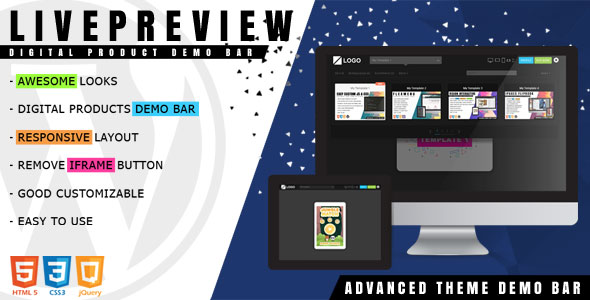
LivePreview is used to manage, switch between your digital products like WordPress themes, HTML templates, HTML5 games and etc. The plugin includes a responsive test tool inside the demo bar, switch panel with thumbnails of the products, buttons for different actions (buy, iframe close). You can customize it by changing the style file (css or less). The plugin can be deployed easily. It runs on all modern browsers and mobile devices like iOS, Android and Windows.
General Settings
Theme – you can select a frontend look from two available themes or create your own style
Logo image & url – set a logo image & url for the demobar
Product List – show or hide the product list, it will allow you to select, filter a product and load it
Responsive devices – show or hide responsive devices. By this option, you will be able to switch to different device size and test your product for responsive
Buy button – show or hide ‘buy’ button by this option. This will show the buy button which when clicked redirects user to the ‘buy url’ that is managed while adding sites via Items section.
Close iFrame – show or hide ‘iframe’ close button, it will allow you to close demobar and redirects user to a demo site
Demo Site Item Settings
Title – allows to set the demo site title
Thumb image – allows to set a thumb image
Demo url – you can set the demo site url with your theme. The site that is added will be shown in this page where you will be able to use the above mentioned features
Buy url – this option allows you to add link to any of your product or site for purchase or download
Badge – allows to set a badge title for the thumb block
Tag – you can set a tag for your demo site. By this option, you can easy to find your demo site by tag filters
Features List
Responsive Layout Design
Responsive Test Tools
Limitless Theme Items
Redirect Function
Modern Browsers Compatible
Easy to use
Version 1.2.3 - 29/10/2020
=============================
- New: search function is based on the item title & tag
Version 1.2.2 - 24/05/2020
=============================
- Fix: filter products on frontend
Version 1.2.1 - 03/04/2020
=============================
- Fix: can't slide the site up or down on Safari 13 and above
Version 1.2.0 - 02/09/2019
=============================
- New: frontend is independent of WordPress themes and third-party plugins
- New: customize the text for the buy button
- New: the ability to select a "default" responsive device
Version 1.1.0 - 22/08/2019
=============================
- New: enable/disable the main preload overlay
- New: set logo URL (open in a new or self window)
- New: enable/disable the product list
Version 1.0.3 - 27/05/2019
=============================
- New: field for the product ID, each item can have a unique URL
- New: work with the browser history
- New: list navigation with arrow keys (up & down)
- New: move a product item to the start or end of the list
Version 1.0.2 - 20/05/2019
=============================
- New: light theme
Version 1.0.1 - 16/04/2019
=============================
- Fix: can't slide the site up or down on Safari 12
Version 1.0.0 - 03/04/2019
=============================
- First release
General Settings
Theme – you can select a frontend look from two available themes or create your own style
Logo image & url – set a logo image & url for the demobar
Product List – show or hide the product list, it will allow you to select, filter a product and load it
Responsive devices – show or hide responsive devices. By this option, you will be able to switch to different device size and test your product for responsive
Buy button – show or hide ‘buy’ button by this option. This will show the buy button which when clicked redirects user to the ‘buy url’ that is managed while adding sites via Items section.
Close iFrame – show or hide ‘iframe’ close button, it will allow you to close demobar and redirects user to a demo site
Demo Site Item Settings
Title – allows to set the demo site title
Thumb image – allows to set a thumb image
Demo url – you can set the demo site url with your theme. The site that is added will be shown in this page where you will be able to use the above mentioned features
Buy url – this option allows you to add link to any of your product or site for purchase or download
Badge – allows to set a badge title for the thumb block
Tag – you can set a tag for your demo site. By this option, you can easy to find your demo site by tag filters
Features List
Responsive Layout Design
Responsive Test Tools
Limitless Theme Items
Redirect Function
Modern Browsers Compatible
Easy to use
Version 1.2.3 - 29/10/2020
=============================
- New: search function is based on the item title & tag
Version 1.2.2 - 24/05/2020
=============================
- Fix: filter products on frontend
Version 1.2.1 - 03/04/2020
=============================
- Fix: can't slide the site up or down on Safari 13 and above
Version 1.2.0 - 02/09/2019
=============================
- New: frontend is independent of WordPress themes and third-party plugins
- New: customize the text for the buy button
- New: the ability to select a "default" responsive device
Version 1.1.0 - 22/08/2019
=============================
- New: enable/disable the main preload overlay
- New: set logo URL (open in a new or self window)
- New: enable/disable the product list
Version 1.0.3 - 27/05/2019
=============================
- New: field for the product ID, each item can have a unique URL
- New: work with the browser history
- New: list navigation with arrow keys (up & down)
- New: move a product item to the start or end of the list
Version 1.0.2 - 20/05/2019
=============================
- New: light theme
Version 1.0.1 - 16/04/2019
=============================
- Fix: can't slide the site up or down on Safari 12
Version 1.0.0 - 03/04/2019
=============================
- First release
Technical Details
- Developer
- Avirtum
- Last Updated
- October 28, 2020
- Published
- November 28, 2025
Compatibility
WordPress Plugins Compatible
No reviews yet
Be the first to review this product.


