1 / 2
WordPress Plugins
Loginstyle - WordPress Login Page Styler
Developed by archtheme
⭐
⭐
⭐
⭐
⭐
4.8
$20
USD
Categories
Utilities
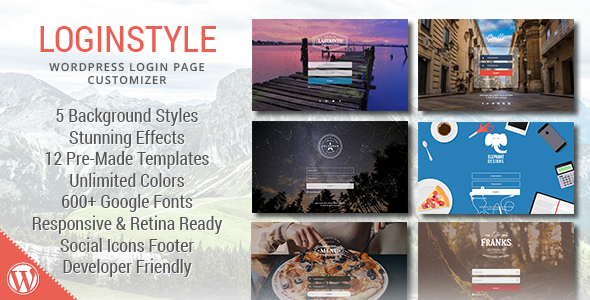
Loginstyle WordPress Login Page Styler
Brand, beautify and style your WordPress login page without any coding knowledge!
Lightweight and fast, this plugin ships with 12 unique templates that installs with one click to immediately transform your login page.
Add stunning effects to your login page such as realistic raindrops or interactive molecules.
With over 150 options in the settings, the possibilities are endless!
Now with improved security with Google reCAPTCHA
!
General
Set Content Width (in px, , em, rem, vw, vh)
Change Font Family: 600+ Google Fonts
Unlimited Font Color (with transparency)
Link and Link Hover Color (with transparency)
Login Redirect URL
Remove Lost Password Link
Remove Back To Link
Remove Error Shake
Custom Error Message
Logo
Logo Style: Default Logo | Custom Logo | No Logo
Logo URL
Logo URL Title
Logo Margins: Set different top, right, bottom, left margins
Custom Logo Source: File or URL
Custom Logo Width x%x Height
Background
Solid Color
Solid Background Color (with transparency)
Gradient Color Background
Gradient Direction: Top to bottom, left to right, top left to bottom right, radial
Gradient Colors: 2 Colors (with transparency)
Image Background
Background Image Source: File or URL
Background Position
Background Repeat
Slider Background
Slide Animation: Fade | Zoom In + Fade | Blur + Fade
Animation Time in seconds
Background Slides Source: File or URL
Unlimited Image Slides
Video Background
Video Source: HTML5 Video | YouTube
Placeholder Image for HTML5 Video
HTML5 Video Source: File or URL
HTML5 Video File for formats: webm, mp4, ogg
YouTube Video ID
YouTube Video Aspect Ratio: 16:9, 4:3, custom ratio
Background Effects
Color Overlay: Unlimited colors with transparency
Dotted Overlay
Blurry Image or Video
Blur Value in px
Realistic Rain Effect: Light Rain | Heavy Rain
Interactive Molecules Effect: White Molecules | Dark Molecules
Form
Form Padding: Set different top, right, bottom, left paddings
Form Background Image Source: File or URL
Form Background Color (with transparency)
Form Background Position
Form Background Repeat
Form Border: Set Border Style, Size and Color
Form Border Radius (in px)
Google reCAPTCHA with light or dark theme
Inputs
Username and Password Label
Show / Hide Username and Password Label
Change Username and Password Label
Set Label Color
Username and Password Placeholder
Set Username and Password Placeholder
Set Placeholder Color
Input Font
Set Input Font Color
Change Input Font Size
Input Text Alignment: left, center, right
Input Padding: Set different top, right, bottom, left paddings
Input Background Color (with transparency)
Input Border
Set Input Border Style
Set Input Border Color
Input Border Width: Set different widths for top, right, bottom, left border
Input Border Radius (in px)
Input Icons
Show / Hide Input Icons
Built In Icon Picker: 14 Username Icons, 15 Password Icons
Icon Position: left or right of input field
Icon Alignment: left, center, right
Icon Font Color
Icon Background Color
Icon Border Size & Color
Icon Container Width (in px)
Remember Me Checkbox Settings
Remove Remember Me
Change Remember Me For Custom Period
Checked by Default
Change Remember Me Label
Checkbox Label Color
Checkbox Background Color
Checkbox Check Color
Checkbox Border Color
Checkbox Border Radius
Submit
Change Submit Button Label
Submit Button Padding: Set different top, right, bottom, left paddings
Submit Button Font Size
Submit Button Move Row: Do not move | Move to Next Row | Move to Previous Row
Submit Button Alignment: Left | Center | Right | Full Width
Submit Background & Hover Color
Submit Font & Hover Color
Submit Button Border: Style, Size, Color & Hover Color
Submit Button Border Radius (in px)
Submit Hover Transition Time (in seconds)
Footer
Footer Text Alignment: left, right, center
Footer Text Content
Unlimited Social Buttons
Built In Icon Picker with 100+ Social Icons
Social Icon Size (in px)
Social Icon Color & Hover Color
Templates
Custom CSS Input
12 One-Click Install Templates
Developer Friendly Export Option for Creating Your Own Template
Changelog
Version 1.2.0 (4 Oct 2024)
- Updated support for WP 6.6
Version 1.1.3 (10 Nov 2019)
- Fixed bug for WP 5.2
Version 1.1.2 (29 Jan 2018)
- Fixed colorpicker css after WP 4.9
Version 1.1.1 (24 Sep 2017)
- Fix bug cannot login without activating Google reCAPTCHA
Version 1.1 (22 Sep 2017)
- Added Google reCAPTCHA option
Version 1.0.7 (8 Sep 2017)
- Added max width to login form to fix not responsive problem
Version 1.0.6 (19 Jun 2017)
- Fixed particles blocking back to link
- Fixed javascript error for username input field
Version 1.0.5 (14 Jan 2017)
- Fix particles blocking password reset form and links
Version 1.0.4 (13 Jan 2017)
- Fix username label removal for WP 4.7
Version 1.0.3 (20 Oct 2016)
- Added support for registration forms
Version 1.0.2 (24 Sep 2016)
- Fix Google fonts loading over http
Version 1.0.1 (12 Jul 2016)
- WP plugin repository false update bugfix
- Fixed template does not load on first install bug
- New feature: Hide "Remember Me" check box,
- New feature: Change "Remember Me" time
- New feature: Customize login error messages
Version 1.0.0 (16 June 2016)
- Initial release
Brand, beautify and style your WordPress login page without any coding knowledge!
Lightweight and fast, this plugin ships with 12 unique templates that installs with one click to immediately transform your login page.
Add stunning effects to your login page such as realistic raindrops or interactive molecules.
With over 150 options in the settings, the possibilities are endless!
Now with improved security with Google reCAPTCHA
!
General
Set Content Width (in px, , em, rem, vw, vh)
Change Font Family: 600+ Google Fonts
Unlimited Font Color (with transparency)
Link and Link Hover Color (with transparency)
Login Redirect URL
Remove Lost Password Link
Remove Back To Link
Remove Error Shake
Custom Error Message
Logo
Logo Style: Default Logo | Custom Logo | No Logo
Logo URL
Logo URL Title
Logo Margins: Set different top, right, bottom, left margins
Custom Logo Source: File or URL
Custom Logo Width x%x Height
Background
Solid Color
Solid Background Color (with transparency)
Gradient Color Background
Gradient Direction: Top to bottom, left to right, top left to bottom right, radial
Gradient Colors: 2 Colors (with transparency)
Image Background
Background Image Source: File or URL
Background Position
Background Repeat
Slider Background
Slide Animation: Fade | Zoom In + Fade | Blur + Fade
Animation Time in seconds
Background Slides Source: File or URL
Unlimited Image Slides
Video Background
Video Source: HTML5 Video | YouTube
Placeholder Image for HTML5 Video
HTML5 Video Source: File or URL
HTML5 Video File for formats: webm, mp4, ogg
YouTube Video ID
YouTube Video Aspect Ratio: 16:9, 4:3, custom ratio
Background Effects
Color Overlay: Unlimited colors with transparency
Dotted Overlay
Blurry Image or Video
Blur Value in px
Realistic Rain Effect: Light Rain | Heavy Rain
Interactive Molecules Effect: White Molecules | Dark Molecules
Form
Form Padding: Set different top, right, bottom, left paddings
Form Background Image Source: File or URL
Form Background Color (with transparency)
Form Background Position
Form Background Repeat
Form Border: Set Border Style, Size and Color
Form Border Radius (in px)
Google reCAPTCHA with light or dark theme
Inputs
Username and Password Label
Show / Hide Username and Password Label
Change Username and Password Label
Set Label Color
Username and Password Placeholder
Set Username and Password Placeholder
Set Placeholder Color
Input Font
Set Input Font Color
Change Input Font Size
Input Text Alignment: left, center, right
Input Padding: Set different top, right, bottom, left paddings
Input Background Color (with transparency)
Input Border
Set Input Border Style
Set Input Border Color
Input Border Width: Set different widths for top, right, bottom, left border
Input Border Radius (in px)
Input Icons
Show / Hide Input Icons
Built In Icon Picker: 14 Username Icons, 15 Password Icons
Icon Position: left or right of input field
Icon Alignment: left, center, right
Icon Font Color
Icon Background Color
Icon Border Size & Color
Icon Container Width (in px)
Remember Me Checkbox Settings
Remove Remember Me
Change Remember Me For Custom Period
Checked by Default
Change Remember Me Label
Checkbox Label Color
Checkbox Background Color
Checkbox Check Color
Checkbox Border Color
Checkbox Border Radius
Submit
Change Submit Button Label
Submit Button Padding: Set different top, right, bottom, left paddings
Submit Button Font Size
Submit Button Move Row: Do not move | Move to Next Row | Move to Previous Row
Submit Button Alignment: Left | Center | Right | Full Width
Submit Background & Hover Color
Submit Font & Hover Color
Submit Button Border: Style, Size, Color & Hover Color
Submit Button Border Radius (in px)
Submit Hover Transition Time (in seconds)
Footer
Footer Text Alignment: left, right, center
Footer Text Content
Unlimited Social Buttons
Built In Icon Picker with 100+ Social Icons
Social Icon Size (in px)
Social Icon Color & Hover Color
Templates
Custom CSS Input
12 One-Click Install Templates
Developer Friendly Export Option for Creating Your Own Template
Changelog
Version 1.2.0 (4 Oct 2024)
- Updated support for WP 6.6
Version 1.1.3 (10 Nov 2019)
- Fixed bug for WP 5.2
Version 1.1.2 (29 Jan 2018)
- Fixed colorpicker css after WP 4.9
Version 1.1.1 (24 Sep 2017)
- Fix bug cannot login without activating Google reCAPTCHA
Version 1.1 (22 Sep 2017)
- Added Google reCAPTCHA option
Version 1.0.7 (8 Sep 2017)
- Added max width to login form to fix not responsive problem
Version 1.0.6 (19 Jun 2017)
- Fixed particles blocking back to link
- Fixed javascript error for username input field
Version 1.0.5 (14 Jan 2017)
- Fix particles blocking password reset form and links
Version 1.0.4 (13 Jan 2017)
- Fix username label removal for WP 4.7
Version 1.0.3 (20 Oct 2016)
- Added support for registration forms
Version 1.0.2 (24 Sep 2016)
- Fix Google fonts loading over http
Version 1.0.1 (12 Jul 2016)
- WP plugin repository false update bugfix
- Fixed template does not load on first install bug
- New feature: Hide "Remember Me" check box,
- New feature: Change "Remember Me" time
- New feature: Customize login error messages
Version 1.0.0 (16 June 2016)
- Initial release
Technical Details
- Developer
- archtheme
- Last Updated
- October 15, 2024
- Published
- November 28, 2025
Compatibility
WordPress Plugins Compatible
No reviews yet
Be the first to review this product.
Gravity Forms - SugarCRM Integration
$49
⭐
5.0
WooCommerce Product Table
$35
⭐
5.0
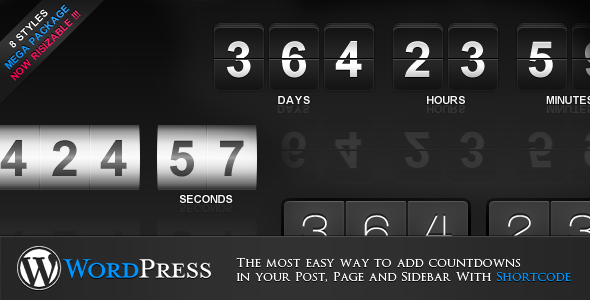
jCountdown Mega Package for WordPress
$18
⭐
4.3
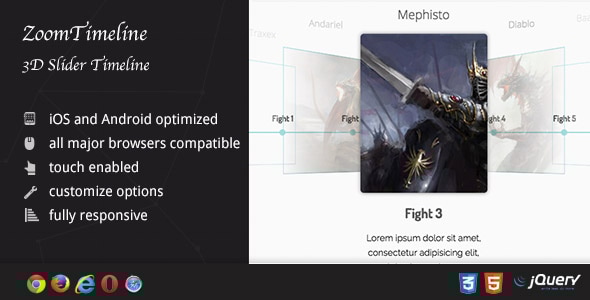
ZoomTimeline AddOn - 3D Slider Timeline
$16
⭐
4.3