WordPress Plugins
Media Boxes Portfolio - Wordpress Grid Gallery Plugin
Developed by castleplugins
⭐
⭐
⭐
⭐
⭐
4.9
$23
USD
Categories
Galleries
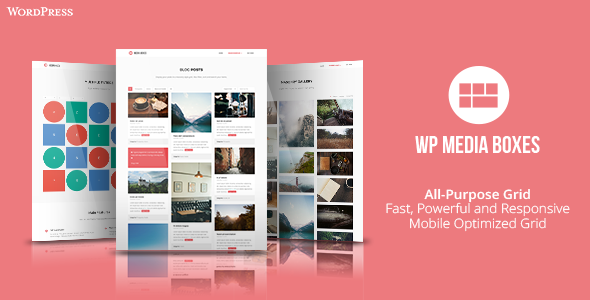
Wordpress Media Boxes is a portfolio plugin that allows you to display all kind of content in a highly powerful grid. Use it for blog posts, display media, clients, portfolios, galleries and more.
it comes with a powerful filter, sorting and search system!
You can put the plugin in any page or post and it will adapt to its container, also you can quickly customize it via the admin panel or the skin editor.
Fully responsive grid and popup
Fully customizable and adaptable to your needs
Friendly admin panel
Friendly skin editor
Import & Export portfolios and skins
Custom meta data on post
Custom post types support
Video tutorials available
Tons of overlay effects
Powerful filtering system
Searching system
Sorting feature
Lazy load Feature
One of the fastest grids out there
You can define the grid layout (the number of columns or the width) for different resolutions, for example maybe you want only one column for a mobile resolution, 3 columns for a tablet resolution and 5 columns for a desktop resolution.
Full width, the grid will adapt to the 100% of its container
Set the number of boxes to load at start and when you click the “load more” button
Retina ready icons
You can load a lot of stuff in the popup like images, videos, sounds, iframes, HTML text, Google maps and ajax content (It doesn’t support video/sound files like .mp4 or .mp3, they need to be iframe based, like in Youtube or SoundCloud)
The plugin is using Isotope v3 which is currently one of the fastest grid systems with filtering out there. Also it uses the best browser features when available (CSS3 transitions and GPU acceleration) and a fallback of simple animation for older browsers
Deep linking: Directly link to the popup so you can share the popup content with your friends or in your social network, just copy and paste the URL generated when you open the popup.
CSS3 Effects and GPU acceleration
Free Technical Support
I’ve used the following icons and scripts
Font Awesome
Isotope v3 ($25 Developer License)
Fancybox 3 ($119 Extended Comercial License)
Magnific Popup
Other JS scripts that you can find in the JS folder
v1.5.5 – January 18, 2023
Fixed issue with some WP installations
v1.5.4 – February 8, 2022
New option to chose the link target (either new tab or same window) when you click on the thumbnail
v1.5.3 – December 17, 2021
Plugin’s files in the back-end are loaded only in the plugin’s admin section
v1.5.1 – March 17, 2021
Fixed small issue with deeplinking when using checkboxes
Improved performance of the WP_Query
Updated the JS components
v1.4.8 – January 7, 2021
Fixed small issue with WP 5.6 (images were not showing up when using the “Original Resolution”)
v1.4.5 – August 13, 2020
Fixed small issue with WP 5.5 (the admin section was showing a loading icon only)
Added support for WP Custom Fields in the skin editor (same steps as ACF fields)
v1.4.4 – July 29, 2020
In the Skin Editor now you can use WP Custom Fields as well as the ACF
v1.4.3 – May 24, 2020
Fixed small bug: you were not able to save a custom url in the skin editor
v1.4.2 – February 05, 2020
In the skin editor now you can use the post-categories and fields from the ACF Plugin
Files of the plugin are only present if the shortcode is used in the page
Fixed issue with random order not being able to be selected
Fixed issue with the first item in the grid, sometimes you were not able to click on it
v1.4.1 – July 29, 2019
Fixed issue where changes were not saved when erasing images from the custom media gallery
Improved performance on the custom media gallery
v1.4 – July 25, 2019
Fixed issue with the custom media gallery, the filter groups had an issue when updating, removing or adding a new filter item
Fixed issue with fancybox when using the auto start feature
v1.3 – June 01, 2019
Updated all the components
Added SEO support, now you can specify the title and alt tags, otherwise it will use the post title
Now the custom gallery is saved in JSON format, this will fix the issue when a server had a max number of inputs allowed in a page and the plugin was using to many, this is not longer the case, YOU MUST RE-SAVE YOUR PORTFOLIOS if you are using the custom media gallery (the plugin will automatically convert it when you click “save”)
v1.2 – March 06, 2019
Now you can use “cascading filters” or “hierarchical filters” since I added the feature that the visibility of certain filter can depend if other is selected
All components were updated
Added the ability to use checkboxes as filters
Added support for the post excerpt in the skin editor
Added the ability to specify multiple image urls to the popup image
Fixed CSS conflicts in the admin section when the theme is using jQuery UI
v1.1.1 – December 17, 2018
Fixed small issue when deleting a skin that’s already being used by a portfolio
v1.1 – December 13, 2018
Now when creating a “Custom Media Gallery” you can add your own categories and associate the images to them, see how this works here: https://www.youtube.com/watch?v=m2O3idiHIW8
Compatible with Wordpress 5 and fixed meta-data design for the new Gutenberg editor
Now you can specify a different skin for a specific post, see this new option in the Meta Data options below your post
Now you can clone/copy your skins and portfolios
If the “pages” have categories then the plugin will use them (for example when using a plugin named “Add Categories to Pages”
Added more video-tutorials to the documentation for easier understanding (if you want a video-tutorial for an specific skin or example let me know)
Fixed an issue when entering single and double quotes in the text fields of the admin section
Fixed minor issues (clear your browser cache since some JS and CSS files were modified)
v1.0 – November 20, 2018
initial release
You can take a look to the documentation HERE
it comes with a powerful filter, sorting and search system!
You can put the plugin in any page or post and it will adapt to its container, also you can quickly customize it via the admin panel or the skin editor.
Fully responsive grid and popup
Fully customizable and adaptable to your needs
Friendly admin panel
Friendly skin editor
Import & Export portfolios and skins
Custom meta data on post
Custom post types support
Video tutorials available
Tons of overlay effects
Powerful filtering system
Searching system
Sorting feature
Lazy load Feature
One of the fastest grids out there
You can define the grid layout (the number of columns or the width) for different resolutions, for example maybe you want only one column for a mobile resolution, 3 columns for a tablet resolution and 5 columns for a desktop resolution.
Full width, the grid will adapt to the 100% of its container
Set the number of boxes to load at start and when you click the “load more” button
Retina ready icons
You can load a lot of stuff in the popup like images, videos, sounds, iframes, HTML text, Google maps and ajax content (It doesn’t support video/sound files like .mp4 or .mp3, they need to be iframe based, like in Youtube or SoundCloud)
The plugin is using Isotope v3 which is currently one of the fastest grid systems with filtering out there. Also it uses the best browser features when available (CSS3 transitions and GPU acceleration) and a fallback of simple animation for older browsers
Deep linking: Directly link to the popup so you can share the popup content with your friends or in your social network, just copy and paste the URL generated when you open the popup.
CSS3 Effects and GPU acceleration
Free Technical Support
I’ve used the following icons and scripts
Font Awesome
Isotope v3 ($25 Developer License)
Fancybox 3 ($119 Extended Comercial License)
Magnific Popup
Other JS scripts that you can find in the JS folder
v1.5.5 – January 18, 2023
Fixed issue with some WP installations
v1.5.4 – February 8, 2022
New option to chose the link target (either new tab or same window) when you click on the thumbnail
v1.5.3 – December 17, 2021
Plugin’s files in the back-end are loaded only in the plugin’s admin section
v1.5.1 – March 17, 2021
Fixed small issue with deeplinking when using checkboxes
Improved performance of the WP_Query
Updated the JS components
v1.4.8 – January 7, 2021
Fixed small issue with WP 5.6 (images were not showing up when using the “Original Resolution”)
v1.4.5 – August 13, 2020
Fixed small issue with WP 5.5 (the admin section was showing a loading icon only)
Added support for WP Custom Fields in the skin editor (same steps as ACF fields)
v1.4.4 – July 29, 2020
In the Skin Editor now you can use WP Custom Fields as well as the ACF
v1.4.3 – May 24, 2020
Fixed small bug: you were not able to save a custom url in the skin editor
v1.4.2 – February 05, 2020
In the skin editor now you can use the post-categories and fields from the ACF Plugin
Files of the plugin are only present if the shortcode is used in the page
Fixed issue with random order not being able to be selected
Fixed issue with the first item in the grid, sometimes you were not able to click on it
v1.4.1 – July 29, 2019
Fixed issue where changes were not saved when erasing images from the custom media gallery
Improved performance on the custom media gallery
v1.4 – July 25, 2019
Fixed issue with the custom media gallery, the filter groups had an issue when updating, removing or adding a new filter item
Fixed issue with fancybox when using the auto start feature
v1.3 – June 01, 2019
Updated all the components
Added SEO support, now you can specify the title and alt tags, otherwise it will use the post title
Now the custom gallery is saved in JSON format, this will fix the issue when a server had a max number of inputs allowed in a page and the plugin was using to many, this is not longer the case, YOU MUST RE-SAVE YOUR PORTFOLIOS if you are using the custom media gallery (the plugin will automatically convert it when you click “save”)
v1.2 – March 06, 2019
Now you can use “cascading filters” or “hierarchical filters” since I added the feature that the visibility of certain filter can depend if other is selected
All components were updated
Added the ability to use checkboxes as filters
Added support for the post excerpt in the skin editor
Added the ability to specify multiple image urls to the popup image
Fixed CSS conflicts in the admin section when the theme is using jQuery UI
v1.1.1 – December 17, 2018
Fixed small issue when deleting a skin that’s already being used by a portfolio
v1.1 – December 13, 2018
Now when creating a “Custom Media Gallery” you can add your own categories and associate the images to them, see how this works here: https://www.youtube.com/watch?v=m2O3idiHIW8
Compatible with Wordpress 5 and fixed meta-data design for the new Gutenberg editor
Now you can specify a different skin for a specific post, see this new option in the Meta Data options below your post
Now you can clone/copy your skins and portfolios
If the “pages” have categories then the plugin will use them (for example when using a plugin named “Add Categories to Pages”
Added more video-tutorials to the documentation for easier understanding (if you want a video-tutorial for an specific skin or example let me know)
Fixed an issue when entering single and double quotes in the text fields of the admin section
Fixed minor issues (clear your browser cache since some JS and CSS files were modified)
v1.0 – November 20, 2018
initial release
You can take a look to the documentation HERE
Technical Details
- Developer
- castleplugins
- Last Updated
- March 3, 2024
- Published
- November 28, 2025
Compatibility
WordPress Plugins Compatible
No reviews yet
Be the first to review this product.
Payment Addon for UserPro
$14
⭐
3.4
NOO Menu - WordPress Mega Menu Plugin
$16
⭐
4.6