1 / 2
WordPress Plugins
Navi: Fullscreen WordPress Menu
Developed by BonfireThemes
⭐
⭐
⭐
⭐
⭐
4.8
$22
USD
Categories
Menus
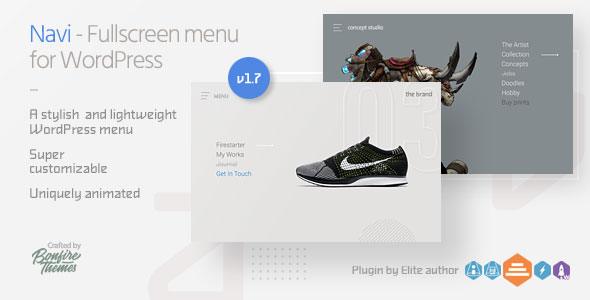
Navi is a stylish and lightweight full-screen menu plugin for WordPress. Perfect for essentially anyone wanting to add a straightforward two-level full-screen menu to their WordPress site, Navi is install-and-go. It can also be customized to suit your site perfectly: changing colors, opacities, menu button animations/positions etc. can be done with just a few quick clicks.
To get all the details on Navi, please see the details on the images above as well as the list below, and do have a look at the live example on the demo site here.
Features:
Customizable, two-level full-screen WordPress menu plugin
Navi uses the built-in WordPress menu builder and customization tools, which makes the plugin lightweight and allows you to use tools already familiar to you
Customize every single color (menu buttons, background, menu items, hover states etc.)
6 different menu button designs
Choose from two menu button animations for each button (or set no animation at all)
Set absolute/fixed positioning for menu button
Set left/right positioning for menu button
Fine-tune top/left/right positioning for menu button
Fine-tune top/left positioning for menu
Customizable logo placement (placement, colors, multiple logo images etc)
Add background image or pattern and change its opacity
Customize background color and its opacity
Customize background lines color and opacity
Optionally show/hide Navi at set resolutions
Optionally hide your theme menu by class/ID when Navi is visible
Works great on both desktop and touch devices
Changelog
Quick update (no version change)
- Some JS script and translation string updates
UPDATE 1.7
- Added option to add secondary logo image which will be shown when menu is opened
- Added option to change logo image size
UPDATE 1.6
- Menu can now also be closed by pressing the ESC button
UPDATE 1.5
- Added option to hide theme menu when Navi is set to be visible
UPDATE 1.4
- A label can now be added to menu button
--- Enter custom text
--- Set custom positioning (label can be placed anywhere around the menu button)
--- Change font size
--- Customize colors
UPDATE 1.3
- Removed old menu button and replaced it with a selection of 6 different menu button designs. Each have 2 different animation possibilities, or none at all. Some also have hover animations.
UPDATE 1.2
- Version 1.2 brings with it a notable re-build of how customization is handled, with all customization options now residing in the WordPress Live Customizer. Thanks to being able to preview your changes in real-time, customization is now much faster, convenient and future-proof than before. Please note: if you purchased Navi before version 1.2, please re-enter your customization settings under "Appearance > Customize > Navi Plugin"
- Added option to add a background image/pattern to the full-screen menu
- Added option to change background image/pattern opacity
- Added option to position menu on right side
UPDATE 1.1
- added logo placement
- for logo, either text or an image can be used (if text, color customization included)
- logo can be placed on left/right of screen (additionally, top/left/right distance can be fine-tuned)
- give logo either fixed or absolute positioning
Please also consider our MEGA Bundle:
To get all the details on Navi, please see the details on the images above as well as the list below, and do have a look at the live example on the demo site here.
Features:
Customizable, two-level full-screen WordPress menu plugin
Navi uses the built-in WordPress menu builder and customization tools, which makes the plugin lightweight and allows you to use tools already familiar to you
Customize every single color (menu buttons, background, menu items, hover states etc.)
6 different menu button designs
Choose from two menu button animations for each button (or set no animation at all)
Set absolute/fixed positioning for menu button
Set left/right positioning for menu button
Fine-tune top/left/right positioning for menu button
Fine-tune top/left positioning for menu
Customizable logo placement (placement, colors, multiple logo images etc)
Add background image or pattern and change its opacity
Customize background color and its opacity
Customize background lines color and opacity
Optionally show/hide Navi at set resolutions
Optionally hide your theme menu by class/ID when Navi is visible
Works great on both desktop and touch devices
Changelog
Quick update (no version change)
- Some JS script and translation string updates
UPDATE 1.7
- Added option to add secondary logo image which will be shown when menu is opened
- Added option to change logo image size
UPDATE 1.6
- Menu can now also be closed by pressing the ESC button
UPDATE 1.5
- Added option to hide theme menu when Navi is set to be visible
UPDATE 1.4
- A label can now be added to menu button
--- Enter custom text
--- Set custom positioning (label can be placed anywhere around the menu button)
--- Change font size
--- Customize colors
UPDATE 1.3
- Removed old menu button and replaced it with a selection of 6 different menu button designs. Each have 2 different animation possibilities, or none at all. Some also have hover animations.
UPDATE 1.2
- Version 1.2 brings with it a notable re-build of how customization is handled, with all customization options now residing in the WordPress Live Customizer. Thanks to being able to preview your changes in real-time, customization is now much faster, convenient and future-proof than before. Please note: if you purchased Navi before version 1.2, please re-enter your customization settings under "Appearance > Customize > Navi Plugin"
- Added option to add a background image/pattern to the full-screen menu
- Added option to change background image/pattern opacity
- Added option to position menu on right side
UPDATE 1.1
- added logo placement
- for logo, either text or an image can be used (if text, color customization included)
- logo can be placed on left/right of screen (additionally, top/left/right distance can be fine-tuned)
- give logo either fixed or absolute positioning
Please also consider our MEGA Bundle:
Technical Details
- Developer
- BonfireThemes
- Last Updated
- January 13, 2021
- Published
- November 28, 2025
Compatibility
WordPress Plugins Compatible
No reviews yet
Be the first to review this product.

WP Shuffle Puzzle
$20
⭐
4.8

WooCommerce Cart PDF
$79
⭐
4.4
Credit Card Payments WordPress
$37
⭐
4.0

WhatsApp Chat - WordPress WhatsApp Chat
$24
⭐
4.7