WordPress Plugins
Simp Modal Window - WordPress Plugin
Developed by WebStudio55
⭐
⭐
⭐
⭐
⭐
4.5
$17
USD
Categories
WordPress Plugins
Simp Modal Window – WordPress Popup Plugin
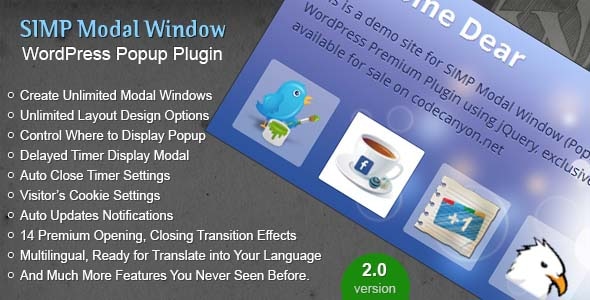
SIMP Modal Window is feature rich popup Plugin for WordPress, you can create unlimited popups with full control over layout, design, display and contents, it’s all up to you where, how, when you want to show a popup to visitors of your website or blog.
Before giving any negative ratings please read help file included in package or contact me using contact form in item support tab, i will do my best to resolve your issue, Thanks!
What Buyer Says About Simp Modal Plugin
webeze777 says:
I’d been looking for a simple modal plugin for awhile, and the ones I found were clumsy or were unsupported. This plug in works as advertised and the support from the developer is top notch. Highly recommend this plugin.
Xancholy says:
Anjum has been very good and quick in their support of this plugin. I was having some issues on my site which they quickly fixed and taught me the right way. Great Support!
digitalplusconsulting says:
Fantastic. I really appreciate your quick response. I will give your plugin 5 starts.
Latest Version 2.0 (April 24, 2025)
Note: Now popup using max-width, max-height, padding and border radius with unites e.g(360px or 60%) instead 360 or 60.
Also Auto Close, Delayed timer and cookie time inputs are changed to input type text so you can enter duration in seconds manually.
New transitions effects are added for both opening and closing modals.
Compatible Tested with WordPress 6.8.x
Added modal duplicate (clone) feature (upon buyers request).
Improved User Interface (show/hide appropriate fields).
Added display modal feature on closing browser window using onbefore unload event.
Added new 14 transitions effects.
Added URL hash popup trigger.
Now support responsive (fluid) popups.
And More…
Live Examples
Facebook Like Box Display Once After 10 Minutes
Trigger On Click Images and Video Popups
Display and Close Popup After Time Duration
Display Popup Only on Archives Pages
Display Popup Only on Search Pages
Display Modal before leaving page On Exit
Main Features
Create Unlimited Modal Windows (Popups)
Unlimited Layout Design Options
Control Where to Display Popup
Delayed Timer Display Modal
Auto Close Timer Settings
Visitor’s Cookie Settings
Auto Updates Notifications
Multilingual, Ready for Translate into Your Language
Each popup has it’s own settings
Design Settings
Select Modal Height, Width, Padding, Border Radius, Background Color use colorpicker.
Modal Border Thickness, Border Style, Border Color use colorpicker.
Background Overlay, Background Overlay Color use colorpicker, Background Overlay Opacity.
Select Modal Box Shadow, Box Shadow Color use colorpicker, Box Shadow Opacity.
Choose Modal Close Icon from 6 Icons, Close Icon Position.
Add Modal Contents CSS Styles for Each Popup.
Display Settings
Enable or Disable Modal
Display On Click on specific CSS selector
Display On Page Load
Trigger popup via URL hash parameter
Display After Time Duration
Display on All Pages, All Posts, All Pages and Posts, On Archive Pages, On Search Pages, on Specific page/post IDs, Hide on Specific page/post IDs, Display Only on Selected Page.
Auto Close Feature, Close Popup after Time Duration, Count Down Timer, Count Down Timer Text Color, Count Down Timer Position.
Cookie Settings
Enable / Disable Cookie for Each Modal
Display Once, will set a ten years cookie
Display Once Again After Every 6 Hours
Display Once Again After Every 12 Hours
Display Once Again After Every 24 Hours
Display Once Again After Every 2 Days
Display Once Again After Every 3 Days
Display Once Again After Every Week (7 days)
Display Once Again After Every 2 Weeks
Display Once Again After Every Month (30 days)
You can Set Cookie Expiration Date Manually using datepicker
Modal Animation Settings
Select a Transition Type, Fade And Pop, Fade, None
Select Animation Speed, 100MS to 1000MS
Enable / Disable Close on Overlay Click
Changelogs Version 2.0 (24 April, 2025)
Added support for block editor
Improvements in transition effects
Improvements in CSS styles
Improvements in modal editing
SIMP Modal Window is feature rich popup Plugin for WordPress, you can create unlimited popups with full control over layout, design, display and contents, it’s all up to you where, how, when you want to show a popup to visitors of your website or blog.
Before giving any negative ratings please read help file included in package or contact me using contact form in item support tab, i will do my best to resolve your issue, Thanks!
What Buyer Says About Simp Modal Plugin
webeze777 says:
I’d been looking for a simple modal plugin for awhile, and the ones I found were clumsy or were unsupported. This plug in works as advertised and the support from the developer is top notch. Highly recommend this plugin.
Xancholy says:
Anjum has been very good and quick in their support of this plugin. I was having some issues on my site which they quickly fixed and taught me the right way. Great Support!
digitalplusconsulting says:
Fantastic. I really appreciate your quick response. I will give your plugin 5 starts.
Latest Version 2.0 (April 24, 2025)
Note: Now popup using max-width, max-height, padding and border radius with unites e.g(360px or 60%) instead 360 or 60.
Also Auto Close, Delayed timer and cookie time inputs are changed to input type text so you can enter duration in seconds manually.
New transitions effects are added for both opening and closing modals.
Compatible Tested with WordPress 6.8.x
Added modal duplicate (clone) feature (upon buyers request).
Improved User Interface (show/hide appropriate fields).
Added display modal feature on closing browser window using onbefore unload event.
Added new 14 transitions effects.
Added URL hash popup trigger.
Now support responsive (fluid) popups.
And More…
Live Examples
Facebook Like Box Display Once After 10 Minutes
Trigger On Click Images and Video Popups
Display and Close Popup After Time Duration
Display Popup Only on Archives Pages
Display Popup Only on Search Pages
Display Modal before leaving page On Exit
Main Features
Create Unlimited Modal Windows (Popups)
Unlimited Layout Design Options
Control Where to Display Popup
Delayed Timer Display Modal
Auto Close Timer Settings
Visitor’s Cookie Settings
Auto Updates Notifications
Multilingual, Ready for Translate into Your Language
Each popup has it’s own settings
Design Settings
Select Modal Height, Width, Padding, Border Radius, Background Color use colorpicker.
Modal Border Thickness, Border Style, Border Color use colorpicker.
Background Overlay, Background Overlay Color use colorpicker, Background Overlay Opacity.
Select Modal Box Shadow, Box Shadow Color use colorpicker, Box Shadow Opacity.
Choose Modal Close Icon from 6 Icons, Close Icon Position.
Add Modal Contents CSS Styles for Each Popup.
Display Settings
Enable or Disable Modal
Display On Click on specific CSS selector
Display On Page Load
Trigger popup via URL hash parameter
Display After Time Duration
Display on All Pages, All Posts, All Pages and Posts, On Archive Pages, On Search Pages, on Specific page/post IDs, Hide on Specific page/post IDs, Display Only on Selected Page.
Auto Close Feature, Close Popup after Time Duration, Count Down Timer, Count Down Timer Text Color, Count Down Timer Position.
Cookie Settings
Enable / Disable Cookie for Each Modal
Display Once, will set a ten years cookie
Display Once Again After Every 6 Hours
Display Once Again After Every 12 Hours
Display Once Again After Every 24 Hours
Display Once Again After Every 2 Days
Display Once Again After Every 3 Days
Display Once Again After Every Week (7 days)
Display Once Again After Every 2 Weeks
Display Once Again After Every Month (30 days)
You can Set Cookie Expiration Date Manually using datepicker
Modal Animation Settings
Select a Transition Type, Fade And Pop, Fade, None
Select Animation Speed, 100MS to 1000MS
Enable / Disable Close on Overlay Click
Changelogs Version 2.0 (24 April, 2025)
Added support for block editor
Improvements in transition effects
Improvements in CSS styles
Improvements in modal editing
Technical Details
- Developer
- WebStudio55
- Last Updated
- April 23, 2025
- Published
- November 28, 2025
Compatibility
WordPress Plugins Compatible
No reviews yet
Be the first to review this product.

Subdomain Pro
$19
⭐
4.1

Bookly Special Hours (Add-on)
$39
⭐
4.3
CSS3 Tooltips for WordPress
$19
⭐
4.2